Microsoft’s AI assistant, Copilot, continues to evolve rapidly. In recent months Microsoft has unveiled a flurry of updates: a new affordable plan for small businesses, an array of powerful AI features, deeper integration across Windows and Edge, and even a friendly AI mascot named Mico. These changes aim to make Copilot more personal, useful, and connected to how people actually work. Also read our coverage on the latest EU AI Act news today: major changes and AMD AI news today: high-performance AI for more AI updates in 2025. In this article we’ll break down the newest Copilot announcements (including Microsoft Copilot Business), walk through the 12 big features from the fall 2025 release, explain how to get started, and compare the different Copilot plans. Strap in – Copilot is getting smarter (and more fun) than ever!
Microsoft 365 Copilot Business is designed for small businesses, bringing enterprise AI into Word, Excel, PowerPoint, Outlook and Teams.
- Microsoft Copilot Business: Enterprise AI for SMBs
- AI Built for Work: Copilot, Work IQ and Agents
- AI Agents and Copilot Studio
- Security & Compliance: Defender and Purview for AI
- Ready to Transform? How to Get Started with Copilot
- 12 Copilot Updates That Redefine Work
- From Clippy to Mico: A Guided AI Interface Returns
- Copilot in Groups: Collab Chats vs ChatGPT Projects
- Copilot Mode in Edge: Your AI-Powered Browser
- Copilot on Windows 11: Your AI Desktop
- Multimodal AI: Microsoft’s MAI Models
- A Strategic Pivot: Contextual AI Across Your Work
-
Frequently Asked Questions (FAQ)
- Q1. Is Microsoft Copilot working now?
- Q2. Does Copilot use ChatGPT?
- Q3. Has there been a major outage affecting Microsoft Copilot on October 29, 2025?
- Q4. Is GPT-5 coming to Copilot?
- Q5. Is Microsoft ending support in 2025?
- Q6. What’s better than Microsoft Copilot?
- Q7. Is Copilot an AI?
- Q8. What is Microsoft’s biggest product segment (in general)?
- Q9. What is the difference between Copilot and Google AI tools?
- Q10. Is Microsoft Copilot free?
- Conclusion
Microsoft Copilot Business: Enterprise AI for SMBs
Microsoft just launched Microsoft 365 Copilot Business, a new Copilot plan aimed at small and midsize businesses. For only \$21 per user per month, this tier brings “secure, enterprise-grade AI into the Microsoft 365 apps SMBs use every day”. In plain English, that means even a 5-person startup can now have Copilot help them draft documents, analyze spreadsheets, or summarize meetings – without the big-company price tag. (By comparison, the standard Microsoft 365 Copilot enterprise license costs \$30 per user per month.)
- Affordable AI: Copilot Business at \$21/user-month is a discounted bundle when added to Microsoft 365 Business plans (through March 2026). This SMB price unlocks the same Copilot power that larger organizations enjoy – the difference is just the price and simplified eligibility (fewer than 300 users).
- All your favorite apps: The plan integrates Copilot into Word, Excel, PowerPoint, Outlook and Teams. In practice, you can summon Copilot within each app to draft emails or reports, analyze data, brainstorm slides, and more – all in context of the file you have open. There’s no need to bounce between tools; Copilot Business works right where you work.
- Work IQ and AI agents: Behind the scenes, Microsoft’s Work IQ intelligence layer powers Copilot Business. Work IQ “learns how you work and who you work with” so Copilot can anticipate your needs and automate routine tasks. For example, Copilot can summarize your unread Outlook threads or pull in the right Teams notes. Plus, Copilot Business supports the new AI agents feature: custom workflows you can create (or Microsoft’s pre-built ones) that automate complex tasks without coding. In short, Copilot Business gives small teams big-company AI tools.
For more insights on Microsoft AI news, see our detailed Microsoft AI Copilot news updates
AI Built for Work: Copilot, Work IQ and Agents
Microsoft likes to say Copilot isn’t just “another AI chatbot” – it’s purpose-built for work. Central to that is Work IQ, a layer that ingests your work data (emails, files, meetings, chats) and learns your patterns. Copilot uses this to give smarter answers: it can answer questions using your company data, suggest the next best action, or even pick which AI model to use for a task.
This means Copilot feels more like a colleague than a random assistant. For example, instead of generically drafting a report, Copilot can tailor it to your style and company context. You might summarize today’s inbox with voice commands, or say “Generate a customer report using last quarter’s CRM data” and Copilot will already know where to pull that info. All this happens without leaving your familiar apps – Copilot Chat and Agent modes are now built right into Word, Excel, PowerPoint, Outlook, OneNote, and Teams.
Copilot Studio’s Agents let you automate complex tasks. In the Microsoft 365 admin center you can see and manage Copilot Agents (IT Admin, Sales Agent, etc.) that work on your behalf across Office apps.
You can also check out other recent AI developments in our AMD AI news today coverage.
AI Agents and Copilot Studio
One of the biggest trends is AI agents: specialized Copilot assistants that can handle entire workflows. Think of an agent as a little coworker that never sleeps. At Ignite 2025 Microsoft showed examples like a Teams Admin Agent (automates user provisioning), a SharePoint Admin Agent (finds and archives idle sites), and even learning/workforce planning agents. Agents can run in the background of Teams or across Microsoft 365, doing things like summarizing meeting notes or preparing data for review.
You don’t need to be a developer to use them. Microsoft’s Copilot Studio provides pre-built agents, and you can even design your own by connecting data and workflows. All agents you create are managed in one place (the “Agent 365” control plane). In that admin portal you get a dashboard of your agents, set permissions, and monitor performance. In short, Copilot and agents together aim to automate your daily work, freeing you from tedious tasks.
Security & Compliance: Defender and Purview for AI

Running AI on business data raises questions about security. Microsoft’s answer is: Copilot works within your existing security stack. Copilot respects all Microsoft Purview sensitivity labels and data governance policies, so it won’t overshare private info. For example, if a Word doc is labeled confidential, Copilot won’t leak its contents into a Teams chat.
For small businesses, Microsoft now offers Defender and Purview plans scaled for SMBs. Defender gives enterprise-grade protection against phishing and malware without requiring a security guru. Purview (formerly Information Protection) governs data across cloud and on-premises. Together with Copilot they provide a locked-down environment: Copilot can see only what you allow, and all AI actions stay within your compliance boundaries.
Ready to Transform? How to Get Started with Copilot
Getting started with Copilot is easy. If you already have Microsoft 365, you likely already have Copilot Chat available at no extra cost – simply log into copilot.microsoft.com or use the Copilot mobile app (iOS/Android). Copilot Chat is a web/mobile interface where you can ask questions, summarize documents, or even upload files to analyze. It will soon even understand your Outlook inbox and calendar, so you could say “Catch me up on yesterday’s meetings” and Copilot replies – all for free.
To unlock the full Copilot experience (Office apps integration and agents), you need a paid Copilot license. Large organizations can add Microsoft 365 Copilot (enterprise tier) to their Microsoft 365 subscriptions. Small businesses can add Copilot Business for \$21/user-month. To buy, you can talk to a Microsoft partner or visit Microsoft365.com/Copilot. Microsoft even bundles deals right now: add Copilot Business to your existing 365 Business plan for extra savings through early 2026.
Below is a quick comparison of the Copilot offerings:
Feature / Plan | Copilot Chat (Free) | Copilot Business (\$21) | Microsoft 365 Copilot (\$30) |
Price (per user/month) | Included with eligible M365 plans | \$21 (for <300 users) | \$30 (enterprise rate)* (paid annually) |
Office Apps AI | No – Chat is separate; limited to Chat app | Yes – Copilot in Word, Excel, PPT, Outlook, Teams | Yes – same as Business plan |
Custom AI Agents | No | Yes (via Copilot Studio) | Yes |
AI Model Choice | Basic Microsoft models | Enterprise-grade (GPT-5, Claude etc.) | Enterprise-grade (GPT-5, Claude etc.) |
Copilot Chat Access | Yes (Web/Mobile) | Yes (same Copilot Chat interface) | Yes |
Best For | Individual users / info lookup | SMB teams (10–300 users) | Large organizations |
*Note: Enterprise Copilot pricing confirmed by Microsoft at \$30/user-month (annual commitment) for larger organizations.
12 Copilot Updates That Redefine Work
On October 23, 2025 Microsoft released a Fall Update for Copilot, adding 12 new features focused on personalization and collaboration. Here are the highlights:
- Groups: Turn Copilot into a group chat. Now you can invite up to 32 people into a shared Copilot session for brainstorming or co-writing. Everyone sees the same Copilot conversation; the AI summarizes the discussion, tallies votes, and splits tasks so the team stays aligned. It’s like merging a group chat and whiteboard with Copilot’s smarts.
- Imagine: A creative co-authoring canvas. Imagine shuffling through AI-generated ideas (text or images) and remixing them with teammates. Whether you need marketing concepts or design prototypes, this hub lets you spark and refine ideas together.
- Mico – The New Copilot Face: Microsoft introduced Mico, a small animated blob avatar, as an optional visual companion. Mico listens, reacts and even changes color to match the mood of your conversation – bringing a bit of warmth to AI chat. Think of it as Clippy’s modern, friendly successor. In fact, Microsoft engineers explicitly drew a line from Clippy (the Office ‘97 paperclip) to Mico – except Mico “combines the personality of early assistants with the intelligence of contemporary AI”.
- Real Talk Style: A new conversational mode that adapts to your tone and gives gentle, Socratic feedback. Instead of flattery, Copilot can now challenge assumptions respectfully – useful for rigorous problem-solving.
- Memory & Personalization: Copilot now can remember things about you – from your next marathon training to your team’s project goals – and bring those up in future chats. It also can recall past conversations so you don’t have to re-explain yourself. (You’re always in control: you can edit or delete these memories.) This “second brain” feature makes each Copilot session more contextually aware.
- Connectors: Copilot can link to services like OneDrive, Outlook, Gmail, Google Drive and Google Calendar. That means you can ask natural-language questions like “Find that spreadsheet Jim emailed me last month” or “What’s on my Google Calendar today?” and Copilot will search across all connected accounts. It simplifies cross-platform info retrieval.
- Proactive Actions: A preview feature where Copilot suggests next steps based on what you’re doing. For instance, if you’re researching travel, Copilot might pop up “Would you like to book flights?” with one click. It’s Copilot stepping out of chat mode to keep your projects moving forward.
- Copilot for Health: An AI health assistant (US only) that grounds answers in trusted sources like Harvard Health. You can ask medical questions and get evidence-backed info, plus find doctors by specialty and location. The goal is to give reliable help when you need it, while citing sources you can trust.
- Learn Live: A voice-enabled tutor mode. Copilot can quiz you socratically on a topic, using questions, visuals, and whiteboards to make learning stick. Whether practicing a language or reviewing math, Copilot becomes an interactive study partner.
- Copilot Mode in Edge – The AI Browser: Microsoft Edge gets superpowers. With Copilot Mode turned on, the browser can see and reason over your open tabs. It can summarize differences between pages, auto-fill forms, and even take multi-step actions by voice or click. For example, say “Compare these two vendor pages and book a conference room” and Copilot will do it. A new feature called Journeys then groups your related tabs into a timeline, so you can revisit ideas without retracing steps.
- Copilot on Windows 11 – Your AI Desktop: Windows 11 now has Copilot built in. You can say “Hey, Copilot” to do anything from drafting a memo to troubleshooting a printer right from the desktop. Copilot Vision adds visual smarts: select part of your screen and ask Copilot to explain it (like an error message), or to help with images. The key is, Copilot is always just a word (or a taskbar click) away.
- Copilot Pages & AI Search: A new collaborative canvas called Copilot Pages lets you mix multiple documents, notes, and AI chats in one workspace. It supports up to 20 files at once. Paired with this is Copilot Search: a unified search experience that shows AI-generated, cited answers alongside regular results. Together they help teams co-author and find information faster and with more confidence in the answers.
These 12 features — covering collaboration, personalization, new input modes and more — illustrate Microsoft’s “pivot from static productivity suites to contextual AI infrastructure”. Copilot is no longer just a chatbot; it’s becoming a platform that connects your people, data and workflows in real time.
From Clippy to Mico: A Guided AI Interface Returns
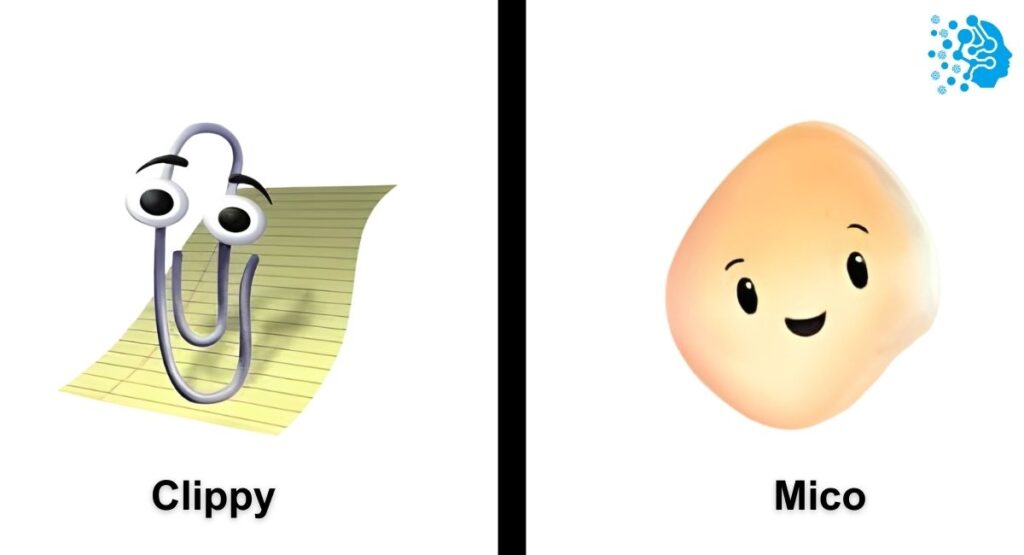
One of the most talked-about additions is Mico, the animated AI mascot. Mico (named after Microsoft Copilot) appears during voice or interactive sessions as a little blob character that blinks and changes color with the conversation. It’s optional, but many users find it comforting – it’s like the software is empathetic, not just text on a screen.
This is a deliberate nod to Microsoft’s past. In the 90s and 2000s Microsoft experimented with “guided” interfaces (remember Office’s Clippy the paperclip or the dog Rover from Microsoft Bob). Clippy famously popped up offering help in Word – sometimes annoyingly so. Mico is a modern reimagining: it has the personality of those old assistants but runs on today’s AI. Crucially, it listens and learns rather than blathering canned tips. Where Clippy often interrupted, Mico waits for your voice and then gently assists, making Copilot chat feel a bit more human.
Copilot in Groups: Collab Chats vs ChatGPT Projects
When Microsoft introduced Copilot Groups, they likened it to competitors’ shared workspaces. In a Group session, any participant can pitch ideas and prompt the AI, and everyone sees the conversation live. This is different from one person prompting the AI and then sharing the output later. In some ways it’s Microsoft’s answer to Anthropic’s Claude Projects and OpenAI’s ChatGPT Projects. Those let teams gather files and prompts in one place; Microsoft’s Groups takes it a step further with real-time interaction.
In practice, imagine preparing a report: your team hops into a Group chat, uploads a spreadsheet, and collaboratively asks Copilot to analyze it. Copilot then summarizes insights, proposes charts, and even assigns follow-up tasks, all while everyone is online together. Behind the scenes it’s all secured by Microsoft 365’s enterprise identity controls, so you get collaboration plus corporate-grade compliance. As Microsoft put it, technology now works for teams, not just for individuals.
Copilot Mode in Edge: Your AI-Powered Browser
Microsoft Edge has become “the world’s first secure enterprise AI browser” with Copilot Mode. Normally a browser is a bunch of tabs and links; with Copilot it becomes an intelligent assistant. Need to research something? Ask Copilot in Edge and it will scan all your open tabs, compare information, and even fill in forms for you. For example, it could cross-reference supplier quotes from multiple pages and automatically enter the best one into a procurement form. You can interact by voice or text: just say “Hey Copilot, summarize the top points from these tabs,” and it will speak back, citing sources.
Edge also introduced Journeys, which are like automatically organized histories of what you were researching. It groups related tabs into a storyline so you can pick up where you left off later, rather than remembering random links you clicked. For heavy researchers or multitaskers, this is a game-changer. As one Microsoft presenter put it, “Historically, browsers have been static — just endless clicking and tab-hopping. We asked how people work, and reshaped the browser accordingly”.
Copilot on Windows 11: Your AI Desktop
Copilot is now woven into Windows 11 itself. You’ll see an “Ask Copilot” icon on the taskbar (with a handy shortcut “Hey Copilot” or Win+C). Click or speak, and you can chat with Copilot from anywhere on your PC. Need an idea for a presentation? You can invoke Copilot right over PowerPoint. Want to fix a stubborn Wi-Fi problem? Show the error message and Copilot Vision can suggest fixes.
Effectively, every Windows 11 PC becomes an AI PC. Copilot acts as a super assistant tied into your files and apps. For enterprise admins, it’s also a secure way to have on-device AI reasoning; your data never leaves your machine unless you allow it. If you’re using Windows 11, Copilot can even float into the Notification Center with an AI-powered Agenda of your day. It’s as if your OS just sprouted an AI layer – a pivot from an “AI assistant” to making the entire OS an AI surface.
Multimodal AI: Microsoft’s MAI Models
Underpinning many of these capabilities is Microsoft’s own family of AI models called MAI (Multimodal AI). Over the past months Microsoft released models like MAI-Voice-1, MAI-1 Preview and MAI-Vision-1. These handle speech, text, and vision in one system. By hosting and tuning its own models, Microsoft can optimize Copilot for speed, security, and seamless integration.
This MAI foundation means Copilot can do things like take a voice command, use GPT-5 reasoning, and even parse an image you show it – all in one flow. It reduces latency and gives Microsoft fine control (updates to the model instantly benefit all Copilot users). For tech teams, it means easier governance: everything runs under Azure compliance. In other words, Copilot’s magic is powered by these in-house models, which are continuously being refined to make your interactions more fluent and “human-centered”.
A Strategic Pivot: Contextual AI Across Your Work
All of the above – Copilot in Office, in Edge, on Windows, Groups, Mico, etc. – feed into Microsoft’s bigger vision. They’re positioning Copilot as a contextual AI infrastructure, not just a standalone assistant. In CEO Mustafa Suleyman’s words, you should judge an AI by “how much it elevates human potential, not just its own smarts.” In practice, that means Copilot now links up emails, chats, files, and apps so that insights flow across them.
For CIOs and tech leads, this means Copilot is becoming a secure orchestration layer: it operates within your data boundaries (thanks to Microsoft’s identity and compliance framework) while understanding context across different sessions and modalities. In effect Copilot is being reframed as a platform: it’s the glue that connects your people, processes, and data with AI, rather than a one-off chatbot tool.
In summary, Microsoft’s latest Copilot news delivers real, practical advances. Copilot Business makes AI accessible to smaller teams, new features like Groups and Edge Mode turn work into a collaborative AI experience, and innovations like Work IQ and Copilot Studio agents show that Copilot is built deeply for enterprise use. And yes, there’s a cute side too – Copilot just got a personality (Mico) to keep things friendly. Whether you’re a tech leader or a busy professional, these Copilot updates mean one thing: your AI helper is getting smarter, more integrated, and more human-friendly by the day.
Frequently Asked Questions (FAQ)
Q1. Is Microsoft Copilot working now?
A1. According to the official status dashboards and user reports, Microsoft Copilot is currently functioning without major global outages.
Q2. Does Copilot use ChatGPT?
A2. Copilot does not run the public ChatGPT app — instead it uses Microsoft’s own integration of OpenAI models, such as GPT-4 Turbo and GPT-5, tuned to their environment.
Q3. Has there been a major outage affecting Microsoft Copilot on October 29, 2025?
A3. Reports indicate a significant disruption on Microsoft Azure (which supports Copilot) around that time, but Microsoft quickly addressed the issue and restored services.
Q4. Is GPT-5 coming to Copilot?
A4. Yes — as of mid-2025 Microsoft rolled out GPT-5 to Copilot users, offering deeper reasoning, better context handling, and improved responsiveness.
Q5. Is Microsoft ending support in 2025?
A5. If you mean older systems like Windows 10, Microsoft did discontinue mainstream support in late 2025 — but Copilot continues to run, though new security updates for Windows 10 have ended.
Q6. What’s better than Microsoft Copilot?
A6. Some users prefer alternatives like ChatGPT, Anthropic Claude or open-source tools such as Langflow or Flowise — especially for specialized workflows or cost-conscious experimentation.
Q7. Is Copilot an AI?
A7. Yes — Microsoft Copilot is an AI-powered assistant built on large language models and designed to help with writing, data analysis, automation, and productivity tasks.
Q8. What is Microsoft’s biggest product segment (in general)?
A8. Microsoft’s major revenue drivers include Cloud (Azure), Office/Microsoft 365 (which hosts Copilot), and Windows — with Cloud and Office among the top segments.
Q9. What is the difference between Copilot and Google AI tools?
A9. Copilot emphasizes integration with business data, apps and memory-driven workflows, while many of Google’s AI offerings focus on generative text and standalone chat interfaces.
Q10. Is Microsoft Copilot free?
A10. Copilot offers a free tier (Copilot Chat) for basic AI tasks, but more powerful features — like deep integration with Microsoft 365 apps, advanced reasoning (e.g., GPT-5), and enterprise agents — require a paid Copilot license.
Conclusion
Microsoft Copilot continues to evolve fast, and today’s updates show exactly where the company is headed — a future where AI becomes a built-in layer across every Microsoft product. Or more AI news and updates, also read: EU AI Act News Today, AMD AI News Today, and Microsoft AI Copilot News Updates. With GPT-4 Turbo and GPT-5 now integrated, Copilot delivers stronger reasoning, better context understanding, and more reliable productivity support. What stands out most is how smoothly Copilot fits into everyday tools like Word, Excel, Outlook, Teams, and Windows, making AI adoption easier for both individuals and organizations.
For businesses, the message is clear: Copilot is no longer just an optional add-on. It’s becoming a core part of Microsoft’s ecosystem and a major driver of workflow automation, data analysis, and content creation. For everyday users, the free version continues to offer solid value, while premium plans unlock advanced features and enterprise-grade security.
If you follow Microsoft Copilot news today, one trend keeps surfacing — Microsoft is doubling down on AI, scaling new features quickly, and ensuring global availability. With cloud stability improving, more integrations rolling out, and new models powering the system, Copilot is shaping into one of the most influential AI tools in the market.
In short, Copilot is working, improving, and expanding. And if the current pace continues, it will remain a major force in the AI landscape for years to come.



I’m Fahad Hussain, an AI-Powered SEO and Content Writer with 4 years of experience. I help technology and AI websites rank higher, grow traffic, and deliver exceptional content.
My goal is to make complex AI concepts and SEO strategies simple and effective for everyone. Let’s decode the future of technology together!